Recent activity on NFSAddons

Need for Speed Most Wanted Downloads
1995 Mitsubishi Eclipse GSX (D33A) -v2- [+Add-on]
![1995 Mitsubishi Eclipse GSX (D33A) -v2- [+Add-on]](/addon_pictures/md800/3347_1.webp)
AuthorAJ_Lethal
Added On
November 22, 2018
Version
Most Wanted
Brand
Mitsubishi
Replaces
None (Addon car) Find more addon cars
Views
19,097
Downloads
3,515
Favorited
9 times
Screenshots (4)
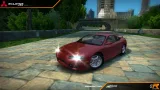
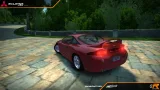
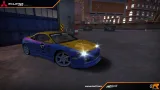
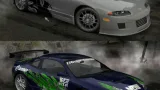
Description
Note: if you want to add the add-on version with Binary, use the Binary v2 Compatibility Pack to do so
v2.0 Rev B: fixed minor mesh bugs, revised installation method for add-on version
converted from NFSPS / Modloader version replaces ECLIPSEGT / Add-on version incompatible with Modloader
Features:
| Can be customized with: |
|
|---|---|
| Other features: |
|
Installation:
Modloader version:
- Make sure you have the NFSMW Modloader installed
- Move the ADDONS folder to your NFSMW folder. Delete any mod replacing ECLIPSEGT first.
Add-on version (make backups first!):
- Make sure you have NFSMW Unlimiter installed first
- Get Ed The Car Dealer to add the GLOBALB entries. To do so:
- Move the ECLIPSED33A.ini file to the Config\NFSMW folder of Ed
- Move the SECONDARY_LOGO_ECLIPSED33A.dds file to the Resources\NFSMW\FrontEnd\FrontEndTextures\729181AD folder of Ed
- Run Ed, open your NFSMW folder and click on the Add Cars button.
- With NFS-VltEd, import the Mitsubishi Eclipse GSX (D33A) Setup.nfsms file, select Install Car (Files and Settings), click Install and save.
- To use add-on cars you should either create a new savefile or patch your existing savefile with the Save Patcher and Save Editor tools. Patch the save first then open the save with the save editor and save it.
Used tools:
Zmodeler 1.07b & 2.1.1 | GIMP | NFS TexEd | DXTBmp | NFSMW ModTools (con compilador de geometría de nlgzrgn) | NFSU2 Texture Compiler (con variante ARGB/DXT5 de ASC) | BinViewer | NFS VLTEd | Notepad | MWInside Model Recompiler
Copyrights/permissions:
If you would like to modify and/or distribute this mod, please:
- keep this readme file without any alterations whatsoever (in case of just sharing this mod around)
- give me proper credit (AJ_Lethal) for creating the mod
- Seriously, respecting those conditions is not hard at all. Unless you're terminally dumb or a shameless, talentless hack.
Random NFS Addon
Newest Addons
- 1998 Honda Integra DC2 Type-R
- Lamborghini Calà
- Most Wanted Chloe Collection
- Most Wanted Multi-Layer Vinyls
- Custom/Random license plates
- Lamborghini Diablo SV (Racer & Pursuit)
- Cop/Police Nissan GTR Proto COPPROTO (ADDON)
- 2005 Vauxhall Monaro VXR (V2)
- Enable Single Player on All Events
- RPD 2016 Ford Police Interceptor Utility (Addon)
Latest Updates
- Lamborghini Calà
- Ford Mustang 3 in 1 pack
- Nissan Altima 3.5 SE '07
- Cop/Police Shelby Daytona Coupe COPCOBRAD (ADDON)
- Cop/Police Lamborghini Countach 5000QV COPCTACH (ADDON)
- Cop/Police Charger06 COPCHARGER06 (ADDON)
- NFS.onl Software: kickStart Netplay Launcher & Lap Recorder
- Ford Mustang 3 in 1 pack
- Nissan Altima 3.5 SE '07
- 2005 Vauxhall Monaro VXR (V2)
Comments 12
I drive this everyday
awesome work
They are in Custom section, you might need Extra Options to access them in the Backroom
what should i enable in the extra options?
oh, I remembered wrong where they were: they are in Unique secion, it's the Unique 10 vinyl; they're only available in the Backroom
Error: You must be logged in to comment on this car.
Not registered yet? Register here. It only takes 30 seconds.
Forget your password? Find it here.