Recent activity on NFSAddons
Need for Speed Most Wanted Downloads
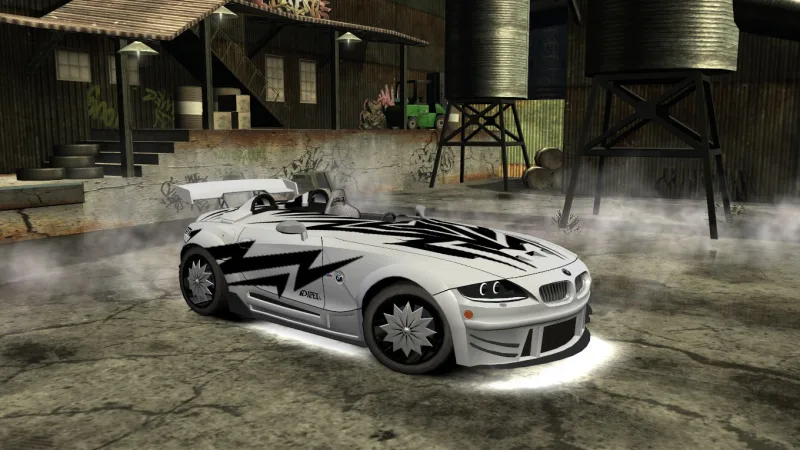
BMW Z4 M Coupé (Extended Customizations)
Screenshots (4)
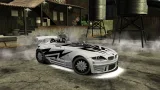
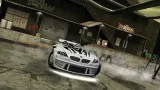
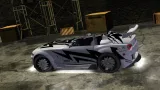

Description
BMW Z4 M Coupé (Extended Customizations) by B345T
Base model and vanilla parts customizations from NFS ProStreet and NFS World. Other custom parts from NFSU2 and by me
Customizations:
- 11 Body kits
- Spoilers + 40 NFSU2 spoilers
- Rims + 15 NFSU2 spinner rims
- 63 Hoods
- Roof scoops
- 11 Interior colors
- 9 Roof styles
- 15 NFSU2 floaters (Brakes section)
- 11 Headlights
- 11 Brakelights
- 45 Side Mirrors
- 6 Attachments
ㅤ• Slot 1 - 11 Steering wheel colors
ㅤ• Slot 2 - 11 Trunk styles
ㅤ• Slot 3 - 11 Engine colors
ㅤ• Slot 4 - 6 Stages roll cage
ㅤ• Slot 5 - 12 Driver seat colors
ㅤ• Slot 6 - 12 Passenger seat colors
- Paint
- Vinyls
- Rim paint
- Window tint
- Decals
- Numbers
- 5 Drivers
Bugs:
- Inaccurate performance and engine sound
- Some customizations may overlap each other
- Pink shader of headlight/brakelight if you haven't installed my previous EC addons
Installation:
0. Have Binary and NFS-VltEd/OGVI first. Then, install NFSMW Unlimiter to your MW
1. Extract this car zip file somewhere. Then, open Binary
2. Choose "User Mode", select "binary_install.end" in the extracted zip file folder, select your MW directory, select your vinyls. Then, save file
3. Open NFS-VltEd/OGVI, open your MW directory in it, import "VltEd/OGVI.nfsms" to it, choose install. After that, save file
4. Create new save file or use SavePatcher to see and use the car
Uninstallation:
1. Open Binary, choose "User Mode", select "binary_uninstall.end" in the extracted zip file, select your MW directory. Then, save file
2. Open NFS-VltEd/OGVI, import "VltEd/OGVI.nfsms" to it, choose uninstall. After that, save file
Random NFS Addon
Newest Addons
- Most Wanted Chloe Collection
- Most Wanted Multi-Layer Vinyls
- Custom/Random license plates
- Lamborghini Diablo SV (Racer & Pursuit)
- Cop/Police Nissan GTR Proto COPPROTO (ADDON)
- 2005 Vauxhall Monaro VXR (V2)
- Enable Single Player on All Events
- RPD 2016 Ford Police Interceptor Utility (Addon)
- Audi RS6 Avant C8
- Nissan Altima 3.5 SE (L32)
Latest Updates
- Ford Mustang 3 in 1 pack
- Nissan Altima 3.5 SE '07
- Cop/Police Shelby Daytona Coupe COPCOBRAD (ADDON)
- Cop/Police Lamborghini Countach 5000QV COPCTACH (ADDON)
- Cop/Police Charger06 COPCHARGER06 (ADDON)
- NFS.onl Software: kickStart Netplay Launcher & Lap Recorder
- Ford Mustang 3 in 1 pack
- Nissan Altima 3.5 SE '07
- 2005 Vauxhall Monaro VXR (V2)
- Improvements for Extended Paints
Comments 7
Error: You must be logged in to comment on this car.
Not registered yet? Register here. It only takes 30 seconds.
Forget your password? Find it here.