Recent activity on NFSAddons



Need for Speed High Stakes Downloads
n4tune: Car Editor & Virtual Test Bench
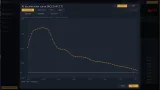
Screenshots (3)
Description
n4tune: Car Editor and Virtual Test Bench for NFS4
n4tune is a comprehensive utility for editing, analyzing, and tuning vehicle characteristics in Need for Speed: High Stakes (1999).
The application combines a vehicle parameter editor, an engine and transmission analyzer, a virtual test bench, automatic calibration tools, and a comparative analysis system.
The main goal of n4tune is to make vehicle tuning easier, more intuitive, and more predictable. Instead of repeatedly modifying parameters and launching the game, users can perform virtual tests, analyze the results, and evaluate how changes affect vehicle behavior.
The application is designed for both mod creators and players interested in vehicle physics and the inner workings of the NFS4 game engine.
Quick video overview: https://youtu.be/kteoNsCFReA
Key Features
- Editing vehicle characteristics.
- Support for the standard CARP.TXT format and the extended CARP.N4E format.
- Engine power and torque analysis.
- Manual and automatic transmission tuning.
- Acceleration and top speed simulation.
- Comparison of multiple vehicles and configurations.
- Simulation of player-controlled and AI-controlled vehicles.
- Automatic calibration of vehicle characteristics against specified performance targets.
- Calibration of AI acceleration tables.
- Test history management and report export.
Vehicle Library
The built-in vehicle library allows users to work with large collections of cars installed in the game or stored in a separate directory.
Key technical specifications are displayed for each vehicle:
- Engine power.
- Torque.
- Mass.
- Number of gears.
- Other vehicle parameters.
The library supports filtering, sorting, adjustable column widths, and CARP file validation to identify errors and compatibility issues.
Vehicle Editor
The editor provides access to vehicle physics parameters, allowing users to modify engine characteristics, transmission settings, and other parameters that determine vehicle behavior in the game.
Both the original CARP.TXT files and the extended CARP.N4E format are supported.
CARP.N4E supports parameter inheritance from the corresponding CARP.TXT file. Overridden parameters are highlighted in color, making them easy to distinguish from inherited values.
Editor features include:
- Parameter grouping by function or gear.
- Built-in parameter descriptions.
- Copying settings between manual and automatic transmissions.
- Graphical and tabular curve editing.
- Torque curve editing.
- AI acceleration table editing.
- Gear shift correction curve editing.
- CSV curve import and export.
- Adjustable torque curve point count.
- Undo and redo.
- Creation of multiple named CARP configuration variants without saving changes to the original file.
The graphical editor allows users to modify individual points or draw curves directly on the chart.
Analyzer
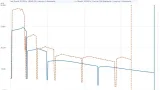
The Analyzer is designed to investigate engine and transmission characteristics.
It allows users to examine power and torque curves, analyze manual and automatic transmission parameters, compare characteristics against reference values, and evaluate how changes affect vehicle performance.
Users can define their own reference points and target values directly on the charts.
CARP Designer
CARP Designer allows users to create vehicle configurations from scratch or calibrate existing setups against specified performance targets.
Supported performance targets include:
- 0–100 km/h acceleration time.
- 0–160 km/h acceleration time.
- 400-meter elapsed time.
- 1000-meter elapsed time.
- Top speed.
- Other supported performance metrics.
This makes it possible to tune vehicles based on real-world specifications, measured test results, or custom gameplay balance requirements.
AI Performance Calibration
A dedicated tool is available for calibrating AI acceleration tables based on virtual test results obtained from a player-controlled vehicle with a manual transmission.
A CARP.TXT file, a CARP.N4E file, or another vehicle's configuration can be used as a reference.
When the calibration results are applied, only the ACC0–ACC7 acceleration tables in the selected CARP.TXT configuration are modified.
Acceleration curve smoothing is available to reduce the impact of acceleration dips during gear changes.
Calibration results can be exported as a separate report containing the original and modified acceleration table values, along with deviations from the specified performance targets.
Virtual Test Bench (Tests and Comparison)
The virtual test bench is one of the key features of n4tune.
It allows users to simulate longitudinal vehicle dynamics without launching the game and conduct tests under consistent, reproducible conditions.
Supported tests include acceleration to a specified speed, timed distance runs, and top speed tests.
Test Conditions
Users can customize the test conditions:
- Road surface type.
- Longitudinal road gradient.
- Manual or automatic transmission.
- Gear shift RPM.
- Launch from idle.
- Handbrake launch at a specified engine RPM.
- AI difficulty level.
- Preservation of the original CARP.TXT top speed cap.
Testing on In-Game Tracks
In addition to testing under ideal conditions, n4tune can use data directly from NFS4 track files.
The application supports both original and custom tracks, including tracks added through track_limit.
The following track properties are taken into account during testing:
- Road surface type.
- AI speed limits from SPD files.
- Starting line position on Sprint tracks.
Loading arbitrary FRD files is also supported.
Using actual track data makes it possible to evaluate the impact of road surfaces on vehicle dynamics.
However, the test bench simulates longitudinal vehicle motion and is not a complete replacement for the game's physics engine. Cornering, interactions between vehicles, and full suspension and road contact physics are not simulated.
Vehicle Comparison (Comparison)
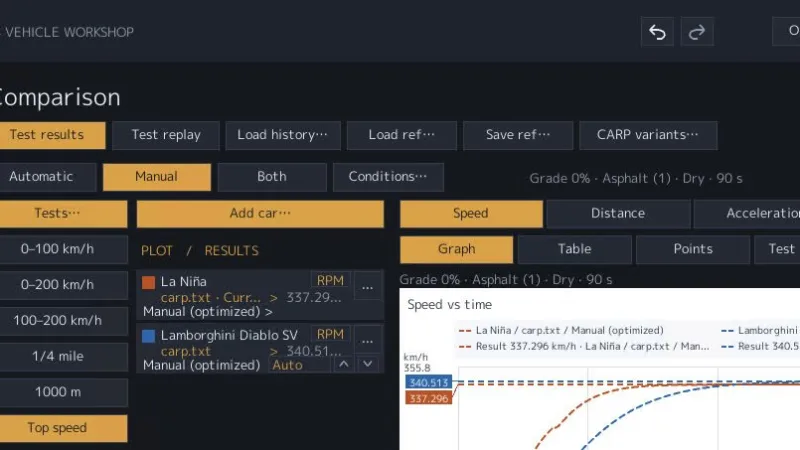
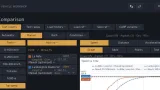
The comparative analysis system allows users to test multiple vehicles simultaneously and display the results on shared charts and in tables.
Users can compare:
- Different vehicles.
- Different CARP configurations of the same vehicle.
- CARP.TXT and CARP.N4E configurations.
- Stock and modified vehicle characteristics.
- Manual and automatic transmissions.
- Player-controlled and AI-controlled vehicles.
- Different AI difficulty levels.
- Different gear shift strategies.
The color, width, and style of each configuration's chart line can be customized independently.
Reference profiles containing measured or specified vehicle performance data are also supported. This allows simulation results to be compared against real-world vehicle specifications.
Interactive Charts
Charts support zooming, panning, coordinate display, adding reference points, and editing target values.
Any supported chart can be opened in a separate window. This allows users to monitor multiple vehicle characteristics simultaneously while editing vehicle parameters.
For example, users can open acceleration, engine RPM, and torque charts, then modify vehicle parameters and observe the results updating in real time.
Test Replay (Replay)
The built-in replay system allows users to examine virtual test results in detail.
The following parameters are available for frame-by-frame analysis:
- Vehicle speed.
- Engine RPM.
- Current gear.
- Distance traveled.
- Vehicle position.
- Differences between the compared configurations.
Replay navigation operates at the game's 64 Hz tick rate, while physics calculations are performed at 32 Hz.
This makes it possible to examine the acceleration process, gear shift events, and differences in vehicle behavior in detail.
Test History (History)
Test results can be saved as individual sessions.
Saved sessions contain the data required to reopen charts, tables, and test replays without recalculating the results.
Previously completed tests can also be rerun.
Report Export (Reports)
n4tune supports exporting analysis and virtual test results in the following formats:
- HTML
- CSV
- JSON
- SVG
- PNG
- Typst
Reports can be used to document vehicle characteristics, publish research results, compare modifications, and further process data using third-party tools.
The report language can be selected independently of the application interface language.
Installation and Launch
- Download the
*-windows-gui.ziparchive. - Extract the archive to a location of your choice.
- Open the
amd64folder for 64-bit Windows or the386folder for 32-bit Windows. - Run
n4tune.exe.
On the first launch, it is recommended to specify the root directory of your Need for Speed: High Stakes installation in the application settings:
Settings → Game folder…
The application will automatically search for vehicles in the following directories:
DATA/CARSSAVEDATA/CARSDATA/EXCARS
To work with a separate vehicle collection, use the Scan folder feature.
Who Is n4tune For?
- NFS4 car and mod creators.
- Creators of custom careers and racing events.
- Anyone balancing vehicle performance across different classes.
- Creators looking to match vehicle performance to real-world counterparts.
- Modders tuning AI behavior.
- Researchers investigating vehicle physics and the inner workings of the game engine.
- Anyone who wants to better understand how CARP parameters affect vehicle behavior.
n4tune allows users to move beyond trial-and-error vehicle tuning toward an approach based on measurable performance, virtual testing, and comparative analysis.
Random NFS Addon
Newest Addons
Latest Updates
- Audi R8 V10 5.2 FSI
- Tokyo SE (small AI fix)
- Atlantica Revisited 2.0
- North Country (higher-res)
- Nissan Skyline R32 GTS-T (UPDATED)
- NFSMW Cheat Menu + FPS Overlay (.asi file)
- Stance Mod NFSMW
- Lenco BearCat G2 Tactical Unit RPD & PPD Version
- NFS Carbon Overbright Mod for MW2005
- Need For Speed Most Wanted : Extreme Hard Final Pursuit (Heat 6)
Comments
No comments yet. Be the first to add one!
Error: You must be logged in to comment on this file.
Not registered yet? Register here. It only takes 30 seconds.
Forget your password? Find it here.