Recent activity on NFSAddons


Need for Speed The Need For Speed Downloads
Track Manager
Description
Track Manager v1.0b
by Mike Latimer
FORWORD/DISCLAIMER: While I am fairly confident that this program will not
cause your computer to explode into flames, I will not accept any
responsibility for problems caused by using this program. This program
does rename TRI files, zip them into "libraries", and delete the original
file. As such, please exercise caution and maintain backup copies until you
are sure this program will work in your environment. This program is
considered beta, and odds are, bugs will be found. I do not expect any
major problems, but needless to say - be careful! Bottom line - USE AT
YOUR OWN RISK! If you find any bugs or would like to see any enhancements,
please send them to the following address: "76702.2334@compuserve.com"
Updates
The Track Manager is currently FREEWARE!! However, the Official Site for
the Track Manager can be found at the following url:
http://webhome.idirect.com/~puck/nfs.html
All updates and new versions will be posted there FIRST! Check back often
for new custom tracks, new utilities, and new info on NFS! Special thanks
go out to Doug Burg for his input into this utility.
Requirements
1. Need for Speed
2. PKZIP and PKUNZIP MUST exists in your path!!!!
3. COMSPEC must be set to the correct location for
COMMAND.COM. (If it does not exist, I will look in C:)
Setup
Setup is easy, simply unzip TRACKMGR.ZIP into the Need for Speed programs
directory, or some subdirectory. The ZIP file contains TRACKMGR.EXE,
TRACKMGR.DOC and a README.TXT file. Upon executing TRACKMGR.EXE, you will
be prompted for path information for the program to work properly. This
information is stored in a TRACKMGR.CFG file, found in the same directory
as TRACKMGR.EXE was executed.
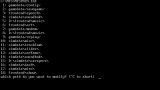
There are two methods for entering the necessary path information,
Automatic and Manual. The Automatic method simply requires the path to
your main NFS directory. If this method is chosen, the default paths are
setup as follows:
- Main NFS Directory: <User must enter this>
- MISC Directory: <MAIN>SIMDATAMISC
- NewTracks/Import Directory: <MAIN>NEWTRACK
**Important: The NEWTRACK Directory will NOT be created
automatically! You must ensure this directory exists, and all
new tracks must be imported from that directory!!
The Manual setup method simply prompts the user for the appropriate path
information.
The last step of the setup process is the creating of a backup of the
original tracks. This process requires the NFS CDRom to be inserted into
your CDRom Drive. You will simply need to supply a drive letter for the
CDRom.
General Usage
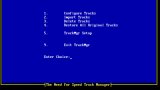
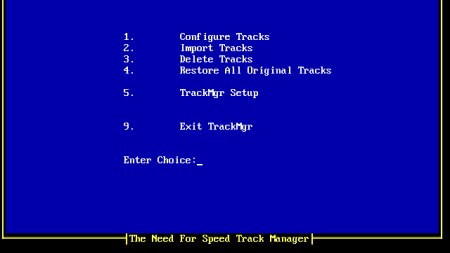
Usage of the Track Manager should be fairly self explanatory. Each of the
options are listed below with a brief explanation.
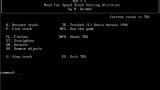
Track Configuration: This option which allows you to activate
imported custom tracks for use in NFS.
Import Tracks:Before activating tracks, you must first
import them into the Track Manager. This
process looks for *.TRI file in the
NewTrack/Import Directory as defined in
Setup.
Delete Tracks:This option allows you to remove tracks
from
the Track Manager. ***This option does not
produce any kind of backup for the deleted
track!
Restore All Tracks:This option restores ALL original tracks.
Setup: This option allows you to change your
directory setup information.
Exit: Exits the Track Manager.
How It Works
Track Manager currently uses ZIP files for storing the imported tracks. A
Database file is used as an index for the TRI files found in the ZIP.
Currently, the Database file is a Text file. At this point in time, after
naming and describing imported tracks, you cannot automatically modify
those entries. Since the DB file is only a Text file, you can extract the
DB file, make the desired modifications and move it back into the ZIP file
(as long as the format of the DB file is not changed).
When configuring tracks, the DB file is read into memory. After choosing
the track you wish to activate, pkunzip is spawned to extract the
appropriate file into the MISC directory.
IMPORTANT IMPORTING INFORMATION
When importing a new track, the Track Manager will look for a TXT file
which has the same name as the TRI file. If it finds that file, it will
attempt to read the first three lines for automatic importation. For this
to work, the FIRST three lines of the TXT file must read as follows:
TRACK NAME="New Track"
REPLACES="TR1.TRI"
DESCRIPTION="Fast and Fun, etc..."
If all users creating tracks conform to this format, importing tracks would
be MUCH easier!!! Obviously, if the Text file does not exist, the user
is prompted for the necessary information. **Note: Track Manager does
delete the imported TRI file, but does not delete the TXT file. (The
assumption here is that it may have more information in it which the user
wants to keep.)
Enjoy!
Known Bugs
Every once in a while, I did notice it hang as it was pulling up imported
track records. Hitting Ctrl-C usually allow the program to continue.
Please let me know if you encounter this problem.
---------------------------------------------------------------------------
Please send comments/bug info to "76702.2334@compuserve.com"
---------------------------------------------------------------------------
Uploader disclamer notes: file uploaded for preservation purposes. There were not much tools/utilities for the original TNFS/TNFS:SE and today are VERY hard to find. This utility will only work under MS-DOS (or with DOSBox). All credits to the author.
Random NFS Addon

Newest Addons
Latest Updates
- Lego Technic Bugatti Chiron Pur Sport
- North Country Fountain Edition
- Cop/Police Gallardo COPGALL (ADDON)
- Cop/Police Mustang COPMUST (ADDON)
- Cop/Police Holden HSV Coupe COPHSVCOUPE (ADDON)
- 1999 Subaru Impreza WRX STI
- NFSMW HQ Window Tint 2.0
- Cop/Police Cross C6.R
- NFS World Elite Carpack (ADDON)
- NFS World Elite Carpack (ADDON)
Visitor Comments
Error: You must be logged in to comment on this file.
Not registered yet? Register here. It only takes 30 seconds.
Forget your password? Find it here.