Recent activity on NFSAddons

Need for Speed Most Wanted Downloads
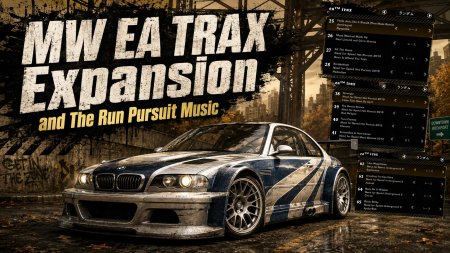
MW EA TRAX Expansion and The Run Pursuit Music
Description
MW EA TRAX Expansion and The Run Pursuit Music — Version 0.4.7
Expand the soundtrack of Need for Speed Most Wanted (2005) with your own MP3/WAV files and music from Underground 2. You can also add eight adaptive pursuit scores from The Run using the converter included in this download.
The Run music is optional. The main EA TRAX expansion works independently and uses stock MW pursuit music until you install converted pursuit audio.
FEATURES
- Import MP3/WAV files into the native EA TRAX system.
- Import 27 Underground 2 songs from your own PC game installation.
- Add up to 94 normal tracks in total, including UG2 music.
- Optionally add eight The Run pursuit scores that adapt to pursuit conditions.
- Generate compressed playback caches locally.
- Display cache-generation progress and restart notifications in the game's configured language.
- Automatically adjust the in-world song HUD for your display aspect ratio, while retaining main-menu and garage positioning.
- Configure the MOD using an INI with English and Japanese comments.
REQUIREMENTS
- Need for Speed Most Wanted (2005), PC edition.
- The supported executable is the NFSPatcher v1.3 EN version, with or without the 4GB Patch. Other executables are not guaranteed to work.
- 64-bit Windows 10/11.
- A 32-bit ASI loader, such as Ultimate ASI Loader.
- Your own audio files or PC installations of the source games for the music you wish to import.
- Free disk space for conversion and cache generation.
The required audio conversion programs are included. No separate Python or audio editor installation is necessary. The game and ASI loader are not included.
INSTALLATION
1. Close MW and extract the complete ZIP.
2. Copy the scripts folder into the folder containing the MW executable.
3. Add your music as described below.
4. Start MW and wait for cache generation. This may take several minutes or longer.
5. When generation finishes, click OK on the completion notice to close the game, then start it again.
The optional converter is included in the TheRunPursuitConverter folder. Install the main MOD before using it.
ADDING MP3/WAV FILES
Copy your audio files into:
scripts/NFSMWEATraxExpansion/Tracks
Subfolders are supported. Optional per-track INI files allow you to specify the title, artist, album and playback context. See the included guide for examples.
ADDING UNDERGROUND 2 MUSIC
1. Locate SDATA/sdat.viv in your own PC installation of Underground 2.
2. Copy it to a working folder and open the copy using a BIG4-compatible archive extractor.
3. Extract PFDATA/MusicSFx.mpf and PFDATA/MusicSFx.mus.
4. Place both files directly in:
scripts/NFSMWEATraxExpansion/UG2MusicSFx
Keep the included MusicSFx.metadata.ini in that folder.
Do not place sdat.viv directly in the MOD folder. Renaming it to .mpf or .mus does not work. Extract the matching pair from the same archive, and do not put them inside an additional PFDATA subfolder.
ADDING THE RUN PURSUIT MUSIC — OPTIONAL
1. Install the main MOD and close MW.
2. Open TheRunPursuitConverter/TheRunPursuitConverter.exe from this package.
3. Select your PC installation folders for The Run and MW.
4. Start conversion and wait for completion. Allow several minutes or longer and several GiB of temporary working space.
5. Launch MW, wait for playback-cache generation, and restart when prompted.
The converter reads Data/Win32/ChunksAudio.sb from your own The Run installation. It supports the verified PC audio layout and rejects mismatched source data. Existing pursuit data is backed up before replacement.
HELP AND CREDITS
English and Japanese installation guides are included. For conversion problems, check Cache/Build.log and NFSMWEATraxExpansion.log inside the MOD folder.
MOD development: Zakkey250.
Thanks to the developers and contributors of vgmstream, FFmpeg, mpg123, miniaudio, MinHook, CPython and PyInstaller. Third-party license notices are included.
No game audio is distributed with this package. Use your own source files.
Random NFS Addon

Newest Addons
- MW EA TRAX Expansion and The Run Pursuit Music
- MW Native Free Roam Racer - Encounter Battle
- NFS II on Windows 95 in 2026?! One Click on Linux — Windows Too!
- XtraTrax
- Pagani Huayra
- More Rival Challenges
- Spotlights Garage
- North Country Fountain Edition
- Blue sky in PlatformCrib
- Lamborghini Estoque (ADDON)
Latest Updates
- Xenon Effects for Need for Speed Most Wanted
- Custom Race Pack
- Corvette Z06 (C6) (Addon)
- Blue sky in PlatformCrib
- BMW M3 E92 Extended Customization
- Vulkan Thrash Driver + Uncapped FPS + Widescreen Patches (All-in-One)
- Vulkan Thrash Driver + Uncapped FPS + Widescreen Patches (All-in-One)
- Fast AI for Snowy Ridge
- The smol model fix for NFSU2
- NFSU2 Opponent Grid Editor Cheat Table
Visitor Comments
Error: You must be logged in to comment on this file.
Not registered yet? Register here. It only takes 30 seconds.
Forget your password? Find it here.