Recent activity on NFSAddons

Need for Speed Most Wanted Downloads
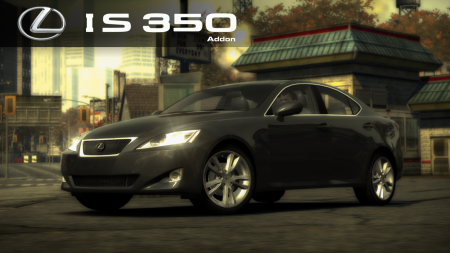
Lexus IS 350
Additional Screenshots
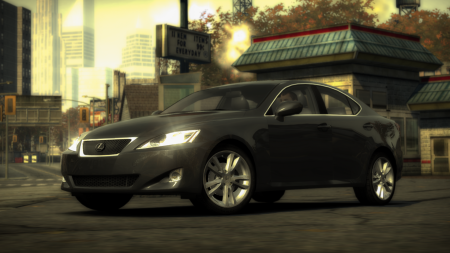
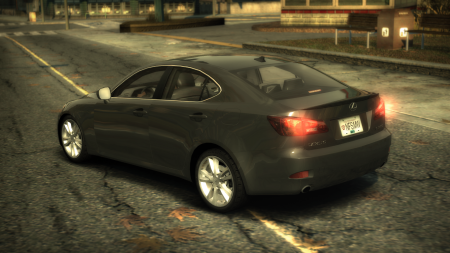

Description
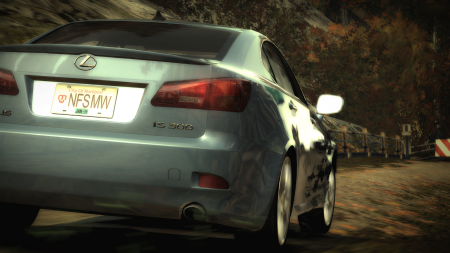
Lexus IS 350 (XE20) From NFS World
Requires:
- Binary
- VltEd/OGVI
- NFSMW Unlimiter
Features:
- VltEd & OGVI both supported.
- Custom performance data.
- Working headlight textures (on/off).
- Working brakelight textures (on/off).
- Available after beating Taz, Blacklist #14 in career mode.
- Cost $37,000
- Driver "Paul"
- LOD parts
- Damage (Scratches)
Parts:
- 1 Bodykit
- Spoilers
- Rims
- 4 Hoods
- Roof Scoops
- Attachment: IS 300 badge
Visual:
- Paint
- Vinyls: 512x & 1024x. Fully compatible with [url=https://nfsmods.xyz/mod/629]NFSMW Recompiled Vinyls[/url] (Modified Taz vinyl included).
- Rim Paint
- Window Tint
- Decals
- Numbers
- Custom Gauges
Known Issues:
- Please report if you see any other issues.
Minor Issues:
- Very limited customization parts (mainly because I suck at modeling).
- Kinda useless.
Installation:
WARNINGS:
! If you have installed add-on cars via Ed or NFSMW ReCompiler before, this car may break your game.
Please backup these files before doing anything.
- Frontend: FrontA.bun, FrontB.lzc
- Global: Attributes.bin, FE_Attrib.bin, Gameplay.bin, Gameplay.lzc, GlobalB.bun, GlobalB.lzc
- Languages: Whole folder
! If you have NFSMW Mod Loader and replacement cars installed using it, please remove them.
This mod WILL BREAK Mod Loader compatibility.
1) Download and install the latest version of NFSMW Unlimiter (which should be v4).
2) Install required car data using Binary: (Compatible with v2.8.3 and up)
1) Download and install the latest version of Binary
2) Run Binary as administrator.
3) Select User Mode. (Tap/click the icon on left.)
4) Select the "Binary_setup.end" from the dialog and tap/click OK.
5) Select your game installation directory.
6) Installation prompt will appear. Choose "Install" to continue with the installation.
7) Wait for it to get installed.
8) When the file save prompt appears, tap/click Yes.
9) When the run game prompt appears, tap/click No.
10) Quit Binary.
3) Install required vault data using VltEd/OGVI
1) Download and install the latest version of VltEd/OGVI
2) Run VltEd/OGVI as administrator.
3) When the main window appears, select File > Open from the menu bar, or press "Ctrl+O".
4) A new dialog will appear. Choose your game installation directory.
5) Select File > Import > ModScript from menu bar, or press "Ctrl+I".
6) Select the "Vlted_setup.nfsms/OGVI_setup.nfsms" from the dialog and tap/click OK.
7) Mod script installation dialog will appear. Choose and tap/click Install to install the mod.
8) Save the files by selecting File > Save from menu bar, or pressing "Ctrl+S".
9) Quit VltEd/OGVI.
4) Run your game and create a new save game; or use a save patcher (not recommended).
Credits:
- Binary by MaxHwoy
- Binary Install Script Template by AJLethal
- Unlimiter by Nlgxzef
- CarToolkit & VltEd by nfsu360
- OGVI v1.4 by ARCHIE
- 80% Car logo from NFSMW HD Car Logos by Madevi
- Installation guide adapted from 2012 Dodge Charger SRT8 by RK1309

Visitor Comments
Error: You must be logged in to comment on this car.
Not registered yet? Register here. It only takes 30 seconds.
Forget your password? Find it here.