Recent activity on NFSAddons
Need for Speed Most Wanted Downloads
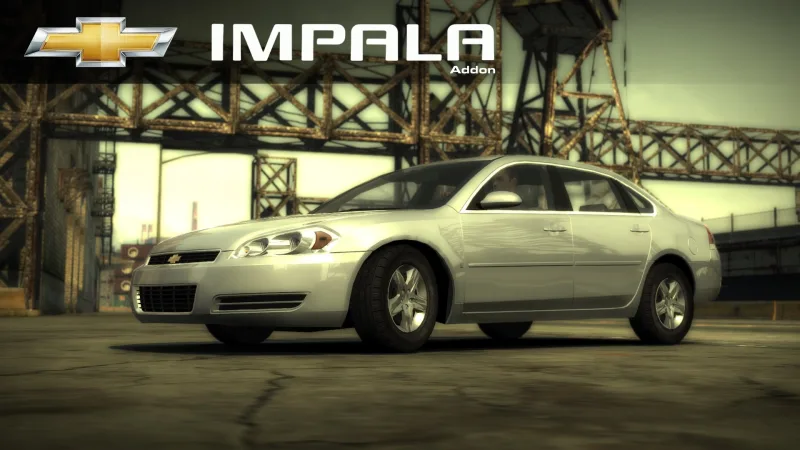
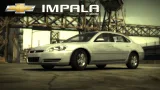
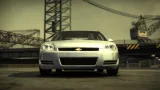
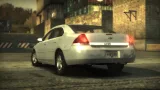
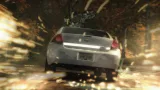
Chevrolet Impala LS (Addon)
Screenshots (4)
Description
Chevrolet Impala LS From Driver: San Francisco
Converted by balcone
Performance by balcone/810
Requires:
- Binary
- VltEd/OGVI
- NFS Unlimiter
Features:
- LOD
- VltEd & OGVI both supported.
- Custom performance data.
- Drives like a brick.
- Working brakelight textures (on/off).
- Available from the beginning.
- Cost $22,000
- "Paul" Drives
- Damage (Scratches)
Parts:
- Spoilers
- Rims
- Roof Scoops
- Attachments: LT badge, License Plate
Visual:
- Paint
- 2 Vinyls
- Rim Paint
- Window Tint
- Decals
- Numbers
- Custom Gauges
Known Issues:
- UV is crap.
- Please report if you see any other issues.
Minor Issues:
- Very limited customization parts (mainly because I suck at modeling).
Installation:
WARNINGS:
! If you have installed add-on cars via Ed or NFSMW ReCompiler before, this car may break your game.
Please backup these files before doing anything.
- Frontend: FrontA.bun, FrontB.lzc
- Global: Attributes.bin, FE_Attrib.bin, Gameplay.bin, Gameplay.lzc, GlobalB.bun, GlobalB.lzc
- Languages: Whole folder
! If you have NFSMW Mod Loader and replacement cars installed using it, please remove them.
This mod WILL BREAK Mod Loader compatibility.
1) Download and install the latest version of NFSMW Unlimiter (which should be v4).
2) Install required car data using Binary: (Compatible with v2.8.3 and up)
1) Download and install the latest version of Binary
2) Run Binary as administrator.
3) Select User Mode. (Tap/click the icon on left.)
4) Select the "Binary_setup.end" from the dialog and tap/click OK.
5) Select your game installation directory.
6) Installation prompt will appear. Choose "Install" to continue with the installation.
7) Wait for it to get installed.
8) When the file save prompt appears, tap/click Yes.
9) When the run game prompt appears, tap/click No.
10) Quit Binary.
3) Install required vault data using VltEd/OGVI
1) Download and install the latest version of VltEd/OGVI
2) Run VltEd/OGVI as administrator.
3) When the main window appears, select File > Open from the menu bar, or press "Ctrl+O".
4) A new dialog will appear. Choose your game installation directory.
5) Select File > Import > ModScript from menu bar, or press "Ctrl+I".
6) Select the "Vlted_setup.nfsms/OGVI_setup.nfsms" from the dialog and tap/click OK.
7) Mod script installation dialog will appear. Choose and tap/click Install to install the mod.
8) Save the files by selecting File > Save from menu bar, or pressing "Ctrl+S".
9) Quit VltEd/OGVI.
4) Run your game and create a new save game; or use a save patcher (not recommended).
5) Done. Enjoy!
Feel free to convert this mod to any game, as long as it's free, and credit me.
Credits:
- Battle Machine livery by El Fish
- Binary by MaxHwoy
- Binary Install Script Template by AJLethal
- Unlimiter by Nlgxzef
- CarToolkit & VltEd by nfsu360
- OGVI v1.4 by ARCHIE
Random NFS Addon
Newest Addons
- Most Wanted Chloe Collection
- Most Wanted Multi-Layer Vinyls
- Custom/Random license plates
- Lamborghini Diablo SV (Racer & Pursuit)
- Cop/Police Nissan GTR Proto COPPROTO (ADDON)
- 2005 Vauxhall Monaro VXR (V2)
- Enable Single Player on All Events
- RPD 2016 Ford Police Interceptor Utility (Addon)
- Audi RS6 Avant C8
- Nissan Altima 3.5 SE (L32)
Latest Updates
- Ford Mustang 3 in 1 pack
- Nissan Altima 3.5 SE '07
- Cop/Police Shelby Daytona Coupe COPCOBRAD (ADDON)
- Cop/Police Lamborghini Countach 5000QV COPCTACH (ADDON)
- Cop/Police Charger06 COPCHARGER06 (ADDON)
- NFS.onl Software: kickStart Netplay Launcher & Lap Recorder
- Ford Mustang 3 in 1 pack
- Nissan Altima 3.5 SE '07
- 2005 Vauxhall Monaro VXR (V2)
- Improvements for Extended Paints
Comments 2
Make a Renault twingo mod and add 2 versions: Stock and 1000 HP
Also this chevy is aura itself it should be the next M3 GTR of MW 2005 *Feels the aura gif*
Error: You must be logged in to comment on this car.
Not registered yet? Register here. It only takes 30 seconds.
Forget your password? Find it here.