Recent activity on NFSAddons

Need for Speed Carbon Downloads
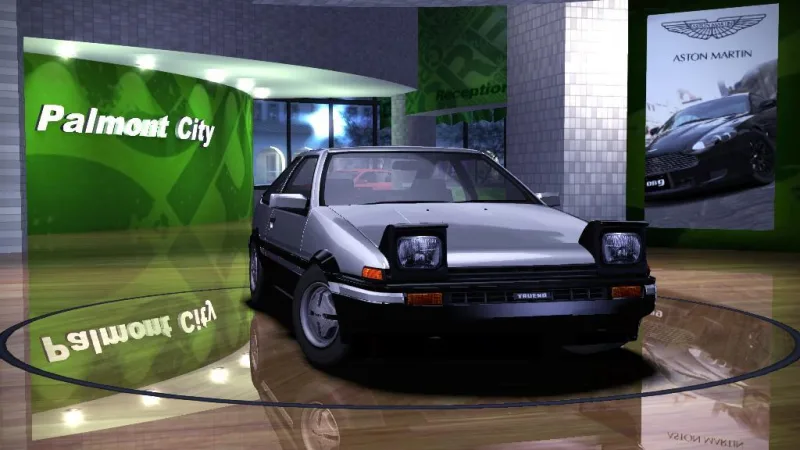
1985 Toyota Sprinter Trueno GT-Apex
AuthorEclipse72Rus
Added On
July 9, 2019
Replaces
Mazda RX-8 (RX8) Find more cars that replace it
Views
11,315
Downloads
1,833
Favorited
1 times
Description
1985 Toyota Sprinter Trueno
This car is converted from Forza Motorsport 4 and it replaces Mazda RX8.
Can be customized with:
- Perfomance
- Bodykits(5)
- Visuals
- Rims
Features:
- Stock bodykit have original black and white livery
- LOD parts
- HQ cockpit
- Working brakelight texture
- NFS UC Driver model
- New rims. (check Work rims; Work Equip can be paintable)
INSTALLATION
1.Unpack all fies.
2.Run setup.exe and select NFS Carbon main directory.
CREDITS
EA/BB - mesh & textures
Turn10 - mesh & textures
SMS - mesh & textures
nfsu360 - for NFSC ModTools
Oleg Melashenko - for ZModeler 1.0.7.& 2.2.5
Eclipse 72rus aka CorvetteZ06 - converting to NFS Carbon.
Newest Addons
- Most Wanted Chloe Collection
- Most Wanted Multi-Layer Vinyls
- Custom/Random license plates
- Lamborghini Diablo SV (Racer & Pursuit)
- Cop/Police Nissan GTR Proto COPPROTO (ADDON)
- 2005 Vauxhall Monaro VXR (V2)
- Enable Single Player on All Events
- RPD 2016 Ford Police Interceptor Utility (Addon)
- Audi RS6 Avant C8
- Nissan Altima 3.5 SE (L32)
Latest Updates
- Ford Mustang 3 in 1 pack
- Nissan Altima 3.5 SE '07
- Cop/Police Shelby Daytona Coupe COPCOBRAD (ADDON)
- Cop/Police Lamborghini Countach 5000QV COPCTACH (ADDON)
- Cop/Police Charger06 COPCHARGER06 (ADDON)
- NFS.onl Software: kickStart Netplay Launcher & Lap Recorder
- Ford Mustang 3 in 1 pack
- Nissan Altima 3.5 SE '07
- 2005 Vauxhall Monaro VXR (V2)
- Improvements for Extended Paints
Comments 7
"Unsuported GlobalMemoryFile.bin file!"
Is there a way to fix this? Please Help!
You have installed previously mods via VltEd or by other method instead of setup.exe. Is this true? If yes, then this install method won't be compatible for good.
You still can install these mods with VltEd. Here I leave you the steps.
0. Go to Game folder (Example: C:Program Files (x86)Electronic ArtsNeed for Speed CarbonCARS), and look for the car you are going to replace (RX8 in this case). Make a backup of the car folder (in case you want to restore original car). Then, make a backup of GLOBAL folder, since you are going to edit many files. THIS STEP IS VERY IMPORTANT if you want to get a previous state of the game.
1. Open VltEd as administrator, to make sure every change is saved.
2. Click File -> Import -> NFS: Carbon Car Settings
3. Select the file with extension *.carbon, which is included in "mod" folder, in the downloaded file. Every change will be set in the script editor.
4. Click File -> Save, or Ctrl+S.
5. Run the game, and look for the car. If you didn't have problems, this car will be shown instead of Mazda RX-8.
If you still have problems, maybe some files got corrupted and you will need to restore it.
So i need to download another Carbon copy ? I really hate this.
Also, do i know you ?
Yup Most of them. Just tried installing this particular mod thorough VltEd (both the old version & the current one BTW.), only to get an error saving it on previous tries; the last one being successful. Let's hope it sticks.
UPDATE: It worked! All it needed was the correct configuration file for it to appear in the game's car dealer. (It appears that the installer doesn't work with modified "GLOBAL" files though. Go figure.) Thanks bro. You the best!!!!Error: You must be logged in to comment on this car.
Not registered yet? Register here. It only takes 30 seconds.
Forget your password? Find it here.