Recent activity on NFSAddons



Need for Speed Porsche Unleashed Downloads
CRP Inspector Beta-RC 1

Additional Screenshots
Description
CRP-Inspector Beta RC1 – 18.04.2026
This is a beta, do not expect a fully perfectly functioning application.
Basic usage:
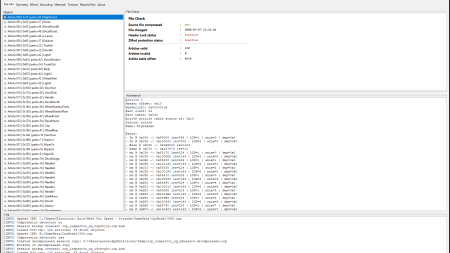
CRPs can be loaded despite being compressed, locked or being damaged to some degree. Upon saving, the Inspector will rebuild a fresh structure from all parsed objects.
The global “Item” Buttons do what they say, depending on the selected tab, you can select geometry, effects or bounding objects and ex/import them, copy or delete them. Exporting items will create a .bin dump with a .json file of the part as sidecar to provide info on how to reimplement the dump in another CRP.
Important: When you export / import geometry, e.g. the driver, include Materials. This will ensure correct material definition. If you uncheck it, the materials will default to 0.
“Reset”
will reload the actual file. All work you do in the Inspector is temp-based
until you save it. Make sure your TPG file is set up with proper files & tpages.
Geometry tab
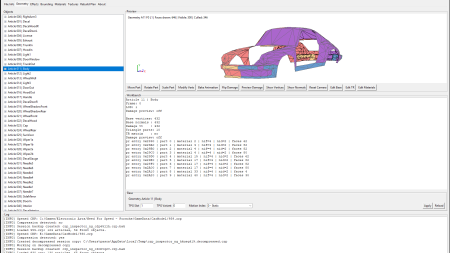
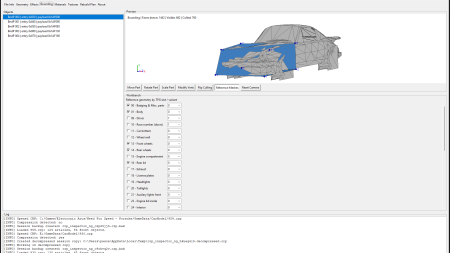
This tab allows basic geometry operations, parts can be entirely moved on 3 axis with “Move Part”, “Rotate Part” or scaled with “Scale Part”.
“Modify Verts” opens a very simple vertex editor. It allows e.g. to correct the dent in the original 928 steering wheel.
“Bake Animation”: If you load a CRP that has objects named as Object_Frame0, Object_Frame1, it will be recognized as possible animation. Clicking the button associates these parts and allows you to create an animated part. Fine-tuning can be done trough base-block-editing.
“Flip
Damage”: Be careful with this button as it will apply the delta vertexes of the
damage info to the mesh every time you press it. Purpose: When you want to modify
a vanilla car, you can use this, save & import the CRP to z-mod and like so
make damaged parts adapted to the original damaged model.
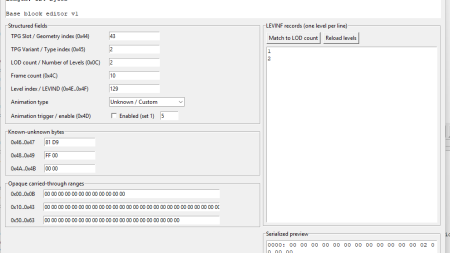
“Edit Base”: This opens a base block editor that allows you to modify the
amount of animation frames, tpg slots and some more.
“Edit TR”: Lets you edit the part origin info. Note: Vanilla cars usually only have tr blocks for pivoted parts. Z-Mod creates one for every part. The vertex cooridnates are relative to the tr-coordinates if an object has a tr info.
“Edit Materials”: Not implemented yet.
Automatic TPG Detection - if you name your car parts e.g. 0100_Body in Z-Mod, export as CRP and open them in the Inspector, a dialogue will pop up offering you to map the parts accordingly to TPG-Slots. The resulting part will be "Body" with TPG slot 01 and variant 00. 1301_WheelFront will automatically become WheelFront with TPG 13/01. This allows you to fully utilize the TPG system for meshes. The slots can still be altered manually and also associated with motion index for Hoods, Doors, etc. - Should be self-explanatory. The automatic motion index association by Z-Mod will not understand this, you have to manually assign which part is a hood, trunk, door, etc. This gives you the opportunity to e.g. create popup headlights.
Effects tab
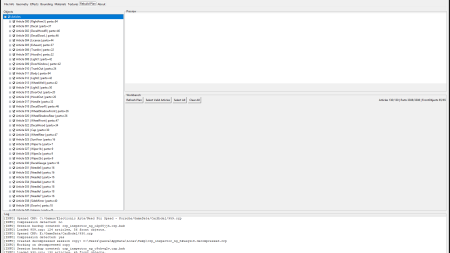
Shows all effects (glares) from the CRP over the reference mesh. This tab allows for basic editing of the effects and im/export. The game does not always behave as planned, this requires deeper research. Moving glares, changing their color etc. usually works fine. You can export/import one glare group at once.
This tab
also features a base block editor, the Effect structure has differences here
that yet have to be correctly implemented.
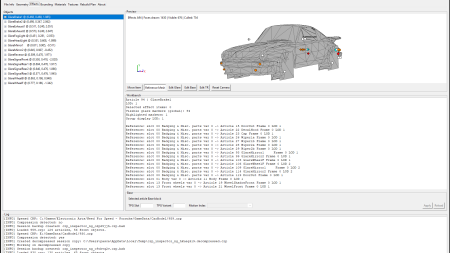
Bounding tab
Moving,
scaling, rotation of bounding objects and also Ex/Import and copying of
Bounding objects possible.
Materials tab
Placeholder
Textures tab
Placeholder
Rebuild plan
Here, you
can select which items to include when saving the CRP. The inspector will pre-unselect
any damaged or invalid objects per default.
About tab
Some info on the CRP Inspector.
Thanks to:
- Mrmaller1905 for publishing the CRP info on Reshax
- The peeps from the “Classic Need for Speed” discord for motivation
- Dr Vannacut for support, motivation, hosting & backup
- All people involved in reverse-engineering the CRP format
Loosely planned features:
- FSH Ex/Import
- FSH Preview
- TPG Editor with preview for geometry & textures
- Material editor
- Damagezone-Editing
Time schedule: None. This project may be abandoned anytime.
Changelog
-
Version 1.1
uploaded April 18, 2026
Freak-DS uploaded a new version. The new file is 1.84 MB.
Compiled file -
Initial version
uploaded April 18, 2026
Rubber-Dragon uploaded initial version. The original file is 0 B.

Visitor Comments
Error: You must be logged in to comment on this file.
Not registered yet? Register here. It only takes 30 seconds.
Forget your password? Find it here.