I have some serious problems with the new version of T3ed and its new renderer for the trackview that makes it impossible to work with it for me 
1: - The trackview window does NOT stay on top of the window... that means that every time I click somewhere on my track the trackview window hides behind the main T3ed window. That's suuuper-annoying.
2: - Light and shadow are shown now in the trackview.. that is correct. But the contrast is soooo big that it is very hard to see a thing where shadows uses a darker gray for raytracing. It does not look anything like in the game. Much more like at darkest night with some floodlight shining where there is some light.
3: - Most of the alpha channels are not transparent anymore. They work for 32-bit "BMP 7D"-code... but not for a 16-bit 1:5:5:5 (with alpha) "BMP 7E"-code anymore... What is very annoying because I use them often when two textures with transparency are very close to each other as this avoids the z-buffer conflict that causes shiny boarders around textures.
That is how it looks an my system:
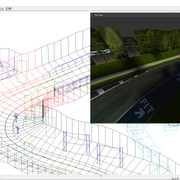
It's the daytime track at brightest sunshine ingame and all the trees and the forrest-texwall have alpha channels. Is there anything I do wrong? Is it just my setup? I am still using Windows 10
1: - The trackview window does NOT stay on top of the window... that means that every time I click somewhere on my track the trackview window hides behind the main T3ed window. That's suuuper-annoying.
2: - Light and shadow are shown now in the trackview.. that is correct. But the contrast is soooo big that it is very hard to see a thing where shadows uses a darker gray for raytracing. It does not look anything like in the game. Much more like at darkest night with some floodlight shining where there is some light.
3: - Most of the alpha channels are not transparent anymore. They work for 32-bit "BMP 7D"-code... but not for a 16-bit 1:5:5:5 (with alpha) "BMP 7E"-code anymore... What is very annoying because I use them often when two textures with transparency are very close to each other as this avoids the z-buffer conflict that causes shiny boarders around textures.
That is how it looks an my system:
It's the daytime track at brightest sunshine ingame and all the trees and the forrest-texwall have alpha channels. Is there anything I do wrong? Is it just my setup? I am still using Windows 10


 ...impressive work on the 80's Imperator. I can't wait to take it for a ride. I really like how Isdera facelifted the car to be ready for the 90's but for me the original one kills it. And thank you sooooo much for the :OT part that makes it a completely different version. Fantastic!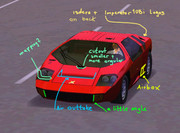

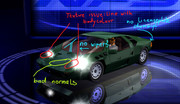
 ...And the ":OL" part vanishes very sudden when cars are still in close distance because it is used like the ":MB" and ":LB" LOD parts and is only shown together when the ":HB" part is loaded.