NFSAddons Forums

Main Menu
Menu

Show posts

This section allows you to view all posts made by this member. Note that you can only see posts made in areas you currently have access to.

Show posts Menu

Messages - PomFrit

#1
Is it possible to enable traffics and cops in Career mode ? Knockouts with traffics and High Stakes with cops can be interesting.
#2
Nice work finding career tracks, i did my own research with your discovery and so far i found this:

EUROPEAN TOUR
    - CIRCUIT 1
   NUMBER OF OPPONENTS - line 00000160 - column 00 ( 05 - 5 OPPONENTS )
        LAPS - line 00000160 - column 04 ( 02 - 2 laps )
   CLASS LIMITATION - 00000160 - column 08 ( 02 - open ) - needs more tests which number limits what, there is also ferrari limitation and who knows what else
        TRACK 1 - line 000001CO - column 00 ( 00 - CELTIRC RUINS )
        TRACK 2 - line 000001D0 - column 0C ( 01 - LANDSTRASSE )
        TRACK 3 - line 000001F0 - column 08 ( 04 - ROUTE ADONF )
    - CIRCUIT 2
   NUMBER OF OPPONENTS - line 000002B0 - column 00 ( 05 - 5 OPPONENTS )
        LAPS - line 000002B0 - column 04 ( 02 - 2 laps )
   CLASS LIMITATION - 000002B00 - column 08 ( 02 - open )
        TRACK 1 - line 00000310 - column 00 ( 00 - CELTIRC RUINS )
        TRACK 2 - line 00000320 - column 0C ( 04 - ROUTE ADONF )
        TRACK 3 - line 00000340 - column 08 ( 05 - DURHAM ROAD )
#3
Block shape is changed to half or low resolution ( i don't remember which is it ) when you come closer ( i don't know why ). Same bug is before descending tunnel.

I tried to fixit, but only thing what works, is to remodel half and low resolution to full and remodel road lines to objects. Replacing bugged block didn't work.
#4
Quote from: pete9516 on Jun 15, 2024,  7:57 AMOr things like police cars not making u turns in tunnels?

I found out why cops don't do U turns in tunnels. I did some testing and when the VRoad point in T3ED has "Chrome/Weather" column is set to "2" ( low chrome and always dry road ) the cops didn't do U turn. However, when is set to "anything else" ( i tested the first 16 numbers , high chrome and road depends on weather ), the cops do U turns in the tunnels.

The only chance to fix this problem is probably to find the address, that prevents Cops do U turn and change it in EXE file.
#5
Lanes are bad and useless thing, maybe in 90s was good, when PCs didnť have enough power and every polygon is counted. Lanes are hard to manipulate, bounded to block and cannot be changed, limited to track resolution ( you have to make same thing in half and low resolution, if you want good rearview mirror ). Objects are way better, i tried replace road lines with object and it works fine.

Every track needs lane edditing, if you look closer, lanes are moved to the right side and often are on grass, under ground or in wall.
#6
Does anyone know how to convert objects from Blender to T3ED? I'm wondering if it's a common thing and I missed it somewhere or not and I should write a guide on how to do it (it's been a few days since I figured it out).
#7
So column 4, 5, C and D are combination of chrome effect and weather effect.

02 - low chrome with always dry road, weather effects has no effect on this
04 - normal chrome with dry or wet road, depends on weather effects disabled or enabled
#8
It's, wrong modeled part of the track. On the picture is originaly Kindiak, if i'm not wrong. If you split vertices, on corrupted greens, you can see doubled polygons. Only chance to fix this, is propably replace broken blocks with not broken and remodel it. It looks like midle polygons are not on middle, but they are moved to the side. This problem have most of EA tracks, like France, Snowy, Ruins, ...
#9
Columns 6 , 7 , E and F in "unknown data" are the sound effects.

I'm sure 04 is sound effect with echo used for tunnels / caves / rocks and 00 is no effect used on most of the track. I tested 01, 02, which i found on atlantica, but i didn't hear any difference.
#10
I was wrong about columns 4 , 5 , C and D in "unknown data". They are the chrome intensity of the car. Column 4 and C for left side, column 5 nad D for right side. Sides are reversed than for the AI lines !

I'm sure 02 is the darkest / weakest chrome used for tunnels and 05 is normal chrome used on most of the track. I tested 00, 01, 04, 06, 07, 08, 0A, 0F but the difference from 05 is barely noticeable or none.
#11
I don't know what do you mean by "lane alignment", i had to see what you did. I tested this just few times and it helped me ( for example AI now see pillars on Scorpio 7 ).

Obstacles are for AI problem only if they didn't follow float numbers or if you have AI float line wrong. Float numbers too close to obstacle may cause AI panic.
Maybe you have AI lines too thin. Middle of AI line may leads through obstacle and AI mostly follow middle, if not following float numbers ( propably Landstrasse or Raceway 3 tunel problem ).
Maybe put obstacle number few Vroad nodes sooner that actualy is, AI may react too late.

Save your track somewere, send link i can look on it.
#12
I look into "unknow data" closer and i think column 0 and 8 are AI lines for the right side and 1 an 9 for the left side.
It's not properly tested, but this is few numbers of my teory ( in brackets are AI lines you can use ):

Right side:

80 - 1 line ( 112 )
C0 - 2 lines ( 112,128 )
E0 - 3 lines ( 112,128,144 )
60 - 3 lines with obstacle in line 112 ( 128,144 )
F0 - 4 lines ( 112,128,144,160 )
70 - 4 lines with obstacle in line 112 ( 128,144,160 )
F8 - 5 lines ( 112,128,144,160,176 )

Left side:

01 - 1 line ( 96 )
03 - 2 lines ( 96,80 )
07 - 3 lines ( 96,80,64 )
06 - 3 lines with obstacle in line 96 ( 80,64 )
0F - 4 lines ( 96,80,64,48 )
0E - 4 lines with obstacle in line 96 ( 80,64,48 )
1F - 5 lines ( 96,80,64,48,32 )

There is more numbers indicate more and bigger obstacles/impassable areas for AI ( lots of in Red Rock ) and numbers which im not sure. It will require a lot of testing.

Edit: Partialy tested on Scorpio7. AI starts avoiding pillars, but needs to be reworked. It was made with blind AI and now AI see pillars and panic on some places.
#13
Quote
May it is different because the VRoad line is on the right side, while on DR it is on left?
I think the same, column 0 and 8 is for right side, 1 and 9 is for left side, but correct number will be tricky. Pillars on Landstrasse tunel are on the line 96, but pillar obstacle is set to 0E and road 0F and also road on line 112 is E0 and not F0, which is confusing.
#14
Quote from: JimDiabolo on Oct 09, 2023,  7:15 AM
Here are two pictures taken from "Durham Road" Actually I think it is the first two bytes (of eight) that are important.

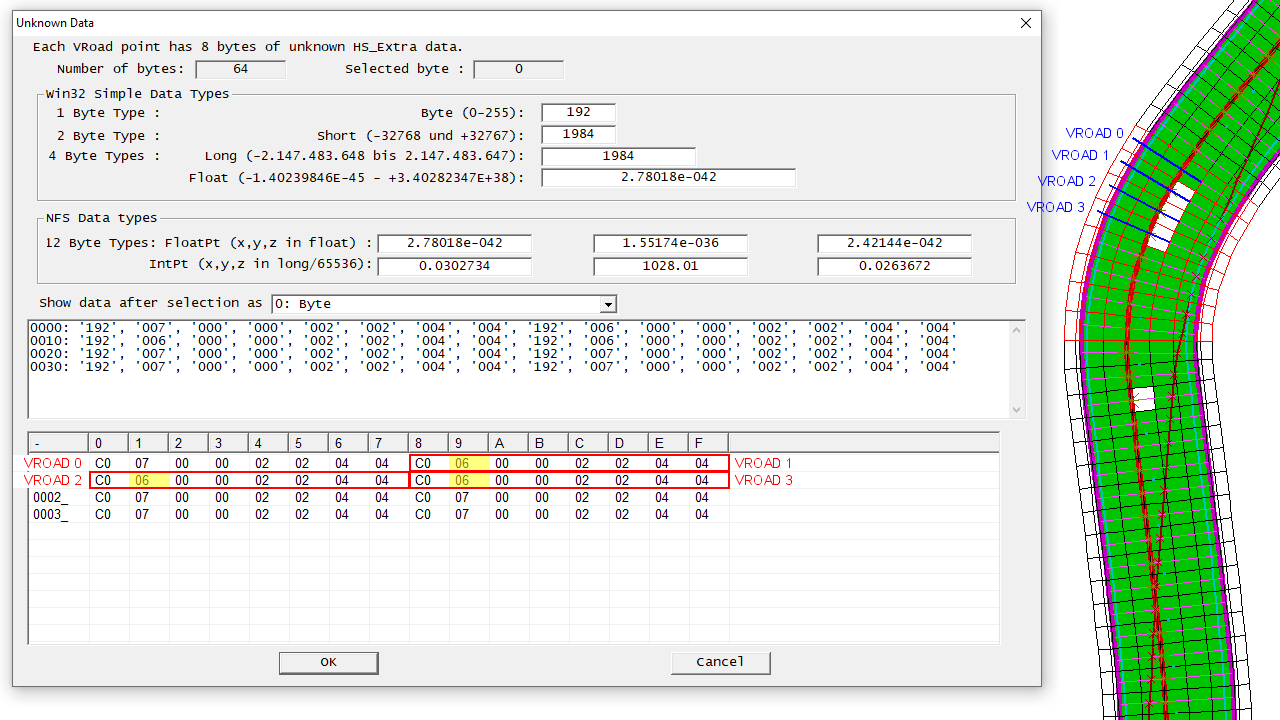
EA propably have different ways how to solve divied roads. I'm struggle with Raceway 3 tunel, less than 50% drives between pillars works fine. I inspect "unknown data" after your findings, but its different than UK. There is none "60" or "70" in the tunel, but exactly on the pillars VRoad is column 1 and 9 changed to "06" instead "07". If i change it to "07", AI can drive between pillars without problem. It will need more tests, but it seem "06" is for AI like "obstacle warning in AI line 96".


Edit: I still can't navigate AI betwwen pillars, because i have 2 choices.

1. AI know where pillars are - but they can't follow float numbers between pillars ( AI panic and around 50% times crash or drive very bad ). If few AI's are close to each other ( or player ), they didn't hit pillars much.

2. AI don't know where pillars are - they can follow float numbers between pillars, but if few AI's are close to each other ( or player ), they hit pillars a lot.


#15
General NFS / Re: NFSHS AI basics/tutorial
Sep 06, 2023, 1:01 AM
I had the same problem when i was doing the Scorpio7 AI, AI just won't see the new obstacles on the tracks if they weren't in the original track. Maybe you can try rebuilding the blocks around the pillar with a block from Durham Road (or another track) with a divided section. That unknown data will be maybe transmitted.